發表文章

「Java」「API」Java.lang.System.getProperties()

針對System.getProperty(String key) The java.lang.System.getProperties() method determines the current system properties. The current set of system properties for use by the getProperty(String key) method is returned as a Properties object. If there is no current set of system properties, a set of system properties is first created and initialized. This set of system properties includes values for the following keys − Key Description of Associated Value java.version Java Runtime Environment version java.vendor Java Runtime Environment vendor java.vendor.url Java vendor URL java.home Java installation directory java.vm.specification.version Java Virtual Machine specification version java.vm.specification.vendor Java Virtual Machine specification vendor java.vm.specification.name Java Virtual Machine specification name java.vm.version Java Virtual Machine implementation version java.vm.vendor Java Virtual Machine implementation vendor java....
「HTML」「DOCTYPE」 HTML文件類型的重要性

<!DOCTYPE> 會告知你的 瀏覽器 這個文件是用哪個版本的 HTML (或 XML )撰寫。Doctype 是一種宣告,而非 tag 。你也可以把它想作「document type declaration」(文件類型宣告),或是縮寫的 「DTD」。 很久以前,網頁通常有兩種版本:網景(Netscape)的 Navigator 以及微軟(Microsoft)的 Internet Explorer。在 W3C 創立網路標準後,為了不破壞當時既有的網站,瀏覽器不能直接起用這些標準。因此,瀏覽器導入了能分辨符合新規範、或屬於老舊網站的兩種模式。 目前瀏覽器的排版引擎有三種模式:怪異模式(Quirks mode)、接近標準模式(Almost standards mode)、以及標準模式(Standards mode)。在 怪異模式 ,排版會模擬 Navigator 4 與 Internet Explorer 5 的非標準行為。為了支持在網路標準被廣泛採用前,就已經建置好的網站,這麼做是必要的。在 標準模式 ,行為(期待)由 HTML 與 CSS 的規範描述起來。在 接近標準模式 ,有少數的怪異行為被實行。 「標準模式」 常用的四種設定方法如下: <!DOCTYPE HTML PUBLIC “-//W3C//DTD HTML 4.01 Transitional//EN” “http://www.w3.org/TR/html4/loose.dtd”> <!DOCTYPE HTML PUBLIC “-//W3C//DTD HTML 4.01//EN” “http://www.w3.org/TR/html4/strict.dtd”> <!DOCTYPE html PUBLIC “-//W3C//DTD XHTML 1.0 Transitional//EN” “http://www.w3.org/TR/xhtml1/DTD/xhtml1-transitional.dtd”> <!DOCTYPE html PUBLIC “-//W3C//DTD XHTML 1.0 Strict//EN” “http://www.w3.org/TR/xhtml1/DTD/xhtml1-strict....

「CSS」「div區塊介紹」 單欄式網頁排版設計

圖片
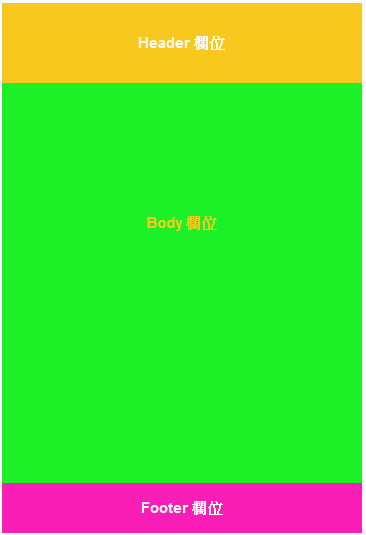
單欄式網頁排版設計 < style type = "text/css" > #Header { width : 360px ; height : 80px ; text-align : center ; line-height : 80px ; font-size : 15px ; color : #fffaf3 ; font-weight : bold ; background-color : #f9c81e ; } #body { width : 360px ; height : 400px ; text-align : center ; line-height : 280px ; font-size : 15px ; color : #f9c81e ; font-weight : bold ; background-color : #1cf027 ; float : left ; } #Footer { width : 360px ; height : 50px ; text-align : center ; line-height : 50px ; font-size : 15px ; ...

「CSS」「div區塊介紹」 二欄式網頁排版設計

圖片
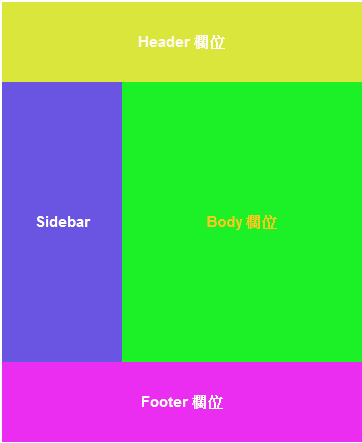
二欄式網頁排版設計: <! DOCTYPE HTML PUBLIC > < style type = "text/css" > #Header { width : 360px ; height : 80px ; text-align : center ; line-height : 80px ; font-size : 15px ; color : #fffaf3 ; font-weight : bold ; background-color : #f9c81e ; } #Sidebar { width : 120px ; float : left ; height : 280px ; text-align : center ; line-height : 280px ; font-size : 15px ; color : #ffffff ; font-weight : bold ; background-color : #6a54e2 ; } #body { width : 240px ; height : 280px ; text-align : center ; line-height : 280px ; f...

「CSS」「div區塊介紹」 三欄式網頁排版設計

圖片
三欄式網頁排版設計: <! DOCTYPE HTML PUBLIC > < html > < head > < title > Free Css Layout 1 </ title > < meta http-equiv = "content-type" content = "text/html; charset=UTF-8" > </ head > < body > < style type = "text/css" > #sitebody { width : 600px ; margin : 0 auto ; font-size : 13px ; } #header { background-color : rgb ( 218 , 230 , 59 ); height : 80px ; text-align : center ; line-height : 80px ; } #sidebar_left { background-color : rgb ( 233 , 92 , 92 ); width : 120px ; height : 400px ; ...

「電腦硬體裝修」「DIP雙列直插封裝」

圖片
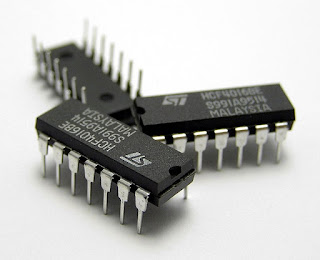
Dual In-line Package ,也稱為 DIP封裝 ,簡稱為 DIP 或 DIL ,是一種 積體電路的封裝方式 ,積體電路的 外形為長方形 ,在其兩側則有 兩排平行的金屬接腳 ,稱為 排針 。DIP包裝的元件可以 焊接在印刷電路板 電鍍的貫穿孔中,或是 插入在DIP插座 (socket)上。 十四針的積體電路即稱為 DIP14 :  Vcc(電源) 第14腳  GND(接地) 第7腳 十六針的積體電路即稱為 DIP16 : Vcc(電源): Vcc(電源) 第16腳  GND(接地) 第8腳 方向和接腳編號 接腳以逆時針的順序編號 如右圖所示,當元件的識別缺口朝上時,左側最上方的接腳為接腳1,其他接腳則以逆時針的順序依序編號。有時接腳1也會以圓點作為標示。 例如DIP14的IC,識別缺口朝上時,左側的接腳由上往下依序為接腳1至7,而右側的接腳由下往上依序為接腳8至14。 資料擷取於Wiki: https://zh.wikipedia.org/wiki/%E9%9B%99%E5%88%97%E7%9B%B4%E6%8F%92%E5%B0%81%E8%A3%9D

「Java」「abstract類別可以不實作介面方法」 Chapter5 Question5

Given: interface Car{ void brand(String s); } abstract class Test4 implements Car{ // insert code } Answer: 可以選擇不輸入 public void brand(String s){ } void brand() { } 但不能與實作介面的方法相同,以下會造成錯誤: void brand(String s){ }